

NordVPN takes the cake as the fastest VPN I’ve tested. It has a huge network of servers with features I have yet to find in most VPN apps. If you can handle the expensive monthly price tag, it’ll be perfect for all of your devices.
Look through any list of the top VPNs and you’ll find that NordVPN has a presence, listed next to other big names like ExpressVPN and Surfshark. But how does it compare?
Its server network spans the globe, apps are available for a variety of platforms, and it’s based in Panama for increased privacy. A few highlights that put it above the competition include download speeds over 280 Mbps, an audit that confirms that they abide by their privacy policy, an app-specific kill switch, dedicated IP addresses you can buy, and obfuscated servers to more easily bypass restrictions.
However, before taking the plunge and paying for this VPN, there are some things you should know first when it comes to prices, device compatibility, privacy, and more.
Everything to Know About NordVPN
- What are the pros and cons?
- How much does it cost?
- Is there a free version?
- Do they take your privacy seriously?
- How secure is it?
- Where are the servers?
- Does it unblock Netflix, Hulu, etc.?
- What’s the data usage limit?
- How fast is it?
- Are torrents allowed?
- Which devices are supported?
- Desktop app review
- Mobile app review
- Browser extension review
- Router & other device support
- Support options
NordVPN Pros and Cons
The Good:
- Strong no-log policy
- Streams Hulu and Netflix
- Has double VPNs that change your IP address twice
- Not part of the Five Eyes alliance
- Can attempt to mask your VPN usage
- Simultaneous connections for 6 devices
- Several payment options, including cryptocurrency
- Automatically finds the best server for you at the time
- Quick login option via email (no need to remember your password)
- Provides DNS leak protection
- Easy access to the onion network
- Desktop and mobile apps have a kill switch
- Blocks ads, malware, and phishing sites
- Desktop app updates in-place
The Bad:
- Too easy to misunderstand pricing
- No refunds for subscriptions paid via gift card
- Unique, dedicated IP addresses cost extra
- Router VPN doesn’t work with routers that only support L2TP or PPTP
- No kill switch control on iOS
How Much Does NordVPN Cost?
Short Answer: The first two years are discounted at $4.13 /month, but you can also pay by year or month.
NordVPN isn’t the cheapest VPN we endorse, but it’s also not the most expensive. ExpressVPN, for example, can only get as low as $8.32 /month, yet PIA is less than $3 /month.
Note: There are three versions of this VPN, depending on whether you want extra features, like a cross-platform password manager or cloud storage. This review covers the Standard version, which has the same VPN offered in the Plus and Complete versions, but doesn’t include those extra features.
These are the primary subscription options:
- $11.99 /month (if you pay monthly)
- $8.29 /month (if you pay $99.48 yearly)
- $3.29 /month (if you pay $78.96 for two years)
The exception is that new users get discounts. The prices above are for renewals (i.e., after you’ve been subscribed for that period of time). For example, when you first sign up, you can get the first year for $4.99 /month (you pay $59), but then the $99.48 /year price kicks in if you renew for another year.
The 2-year plan is a bit misleading compared to the others since it doesn’t actually renew every two years. If you choose this one, it’ll cost $78.96 for the first two years only, and will then renew on a yearly basis for the same price as the 1-year plan. It’s essentially a way to save some money for the first two years of your subscription since it’s cheaper than the monthly plan.
Their coupon page lists additional plans if you want to go with a 3-month, 6-month, 15-month, or 20-month subscription instead. Students and apprentices can get an extra 15% off.
There are several payment methods to pick from, including credit or debit card, cryptocurrency (through CoinGate), Google Pay, Amazon Pay, and ACH transfer. You can also make a payment directly from your device’s app store, such as iTunes, as well as via cash if you buy a subscription in a supported retail store (e.g., Best Buy, Staples, Walmart, Sam’s Club, etc.).
All of these plans come with a 30-day money-back guarantee. Here are some other important details to remember:
- If you cancel your account after 30 days, you won’t be refunded for the unused part of the service period.
- NordVPN can’t issue refunds for purchases made through the Apple App Store or resellers; you’d have to contact Apple, Best Buy, etc., for that.
- Payments made using prepaid cards or gift cards will not be refunded.
- You can only get a refund twice.
- Monthly plans renew the day of auto-renewal, and other plans renew 14 days prior unless you cancel automatic payments.
Can You Use NordVPN For Free?
Short Answer: There’s isn’t a long-term free option, but you can get your money back within 30 days or take the trial for a spin from the mobile app.
Some VPNs are 100% free, and if not, they might offer a free trial so that you can try out the app for a few days before buying a subscription. This is what NordVPN offers. You’ll need the mobile app to get the trial, but it’ll give you 7 full days to try it out before you have to pay.
You can also take advantage of the 30-day money-back offer. This would let you use the VPN (after paying) for a few weeks, and if you’re not satisfied, you can request a full refund.
Atlas VPN is an alternative choice that has a free version with no data caps, so you can use it 24/7 without ever running out of bandwidth. Another no-cost VPN service we endorse is TunnelBear.
Is NordVPN Private?
Short Answer: Their no-log promise has been verified through an audit. They don’t know or store your real IP address or what you do online.
A virtual private network isn’t necessarily private just because it uses the word in its name. A fully encrypted tunnel still has to have an endpoint where the data is decrypted (see how VPNs work). How the decrypted data is handled by the VPN service is one way you can determine if it’s truly private or not.
You could comb through a VPN’s privacy policy (which we do below) to see what their guidelines are when it comes to logging data about you but NordVPN takes it a step further by completing an audit to confirm their privacy policy is true. The audit, conducted by PwC Switzerland and performed in May 2020, concluded that NordVPN hadn’t in any way violated their no-logs promise.
What’s their no-log guarantee? According to their strict no-log policy info page, they don’t track, collect, or share your private data. Their privacy policy confirms this:
Nord guarantees a strict no-logs policy for NordVPN Services, meaning that your internet activity while using NordVPN Services is not monitored, recorded, logged, stored or passed to any third party. We do not store connection time stamps, used bandwidth, traffic logs, IP addresses or browsing data.
NordVPN Privacy Policy
However, they do either store or process some information. This is necessary for any VPN to run their operations effectively. But general logging practices aren’t the same as maintaining logs that can tie your online activity back to you. Some information needs to be recorded to make everything run smoothly.
When we put it all together, this is what NordVPN does and doesn’t keep track of:
Does collect:
- Email address
- Username and the timestamp of the last session status (used to limit concurrent connections to six; deleted 15m after disconnecting)
- Customer service emails and chats (deleted after 2 years)
- Server load information (CPU and RAM usage)
- Whether you used the VPN in the last 30 days
- App diagnostics and usage stats
- Device info (model and operating system version)
Doesn’t collect:
- Connection timestamps
- Session information
- Used bandwidth
- Traffic data
- IP addresses
It’s important to clarify that even the usage statistics and device information include non-identifying data. Knowing what model of phone you have or what version of the Windows operating system you’re running doesn’t let NordVPN know what you’re doing on their VPN.
Here are some other privacy-related questions you might have:
Where is NordVPN based?
Its parent company is Tefincom S.A., which is registered in Panama’s jurisdiction and therefore doesn’t have to abide by any mandatory data retention laws.
Being based in Panama allows us to keep no logs of users’ online activity (no IP addresses, browsing data, traffic information, etc.). This means that we are unable to link an individual user to a specific IP address, connection timestamp or other information that we do not collect.
How do they deal with data requests?
Since NordVPN doesn’t store extensive details about its users, little information can be given up to authorities who demand it.
In cases where, following an appropriate legal process, we are able to identify a specific person, we will provide the limited data we process per our Privacy Policy. Depending on a specific case, this may include user’s email, payment information (date of purchase, payment method and available details), subscription period, password expiration date or a country the user chose when registering for the Services.
Is payment information collected?
They store your full name and part of your credit card number.
Our payment processing partners process basic billing information for payment processing and refund requests (such as date of purchase, payer’s IP address, zip code, card owner’s full name and credit card information). We also process some of the same payment information ourselves (e. g., card owner’s full name, last few digits of your credit card) in cases of recurring payments.
Does NordVPN know where I’m from?
Your IP address isn’t collected when you use the VPN but your country details are when you sign up.
When providing your payment details, we ask our users to provide the country where they are registered, have a permanent address or usually live. This information is necessary for VAT calculation purposes.
How Secure Is NordVPN?
Short Answer: A proprietary VPN protocol is available, as well as double encryption protection and access to a secondary anonymous network.
Like most VPNs, this one uses AES-256 encryption. It’s considered unbreakable with today’s tools, so it’s the best of the best in terms of security for the data that flows through the encrypted tunnel.
NordVPN uses either the NordLynx or OpenVPN encryption protocol. It’s your choice when you use the app, or you can have it chosen for you automatically. IKEv2 is available, too, but only on macOS and iOS.
Another security measure is the option to connect to a double VPN. It encrypts your data twice and prevents the second server from seeing your real IP address. Most VPNs don’t provide built-in support for this, so NordVPN is a good choice if you’re after that type of connection.
Onion over VPN is another unique option where all your traffic is routed through the onion network without the need for Tor Browser. There’s a special server meant just for this in the NordVPN apps, making everything you do on the VPN even more anonymous. Most other VPNs don’t have servers for that, so you’d need to open Tor Browser in order to reach the onion network.
What about hacking? If a VPN has been hacked, it means that there are one or more susceptibilities that the attacker was able to take advantage of. Whether or not they could glean any useful information from the hack is something else to take note of because a hack isn’t all that useful if the provider doesn’t have any personal data on its users. Regardless, though, if a VPN is prone to successful attacks, it’s best to avoid it.
NordVPN faced an incident in 2018 that was caused by a third-party datacenter’s server vulnerability. You can follow that link to learn more, but all you really need to know is that they shredded the server the same day they found out about the attack, severed ties with the server provider, and began encrypting each new server they built. It also prompted them to launch an audit of the entire service and put together an extensive security plan to help prevent future attacks.
It’s clear that NordVPN takes security very seriously, and I’m comfortable recommending it based on their response to that intrusion. It’s also important to note that no user activity logs were uncovered during that attack:
The intruder did not find any user activity logs because they do not exist. They did not discover users’ identities, usernames, or passwords because none of our applications send user-created credentials for authentication.
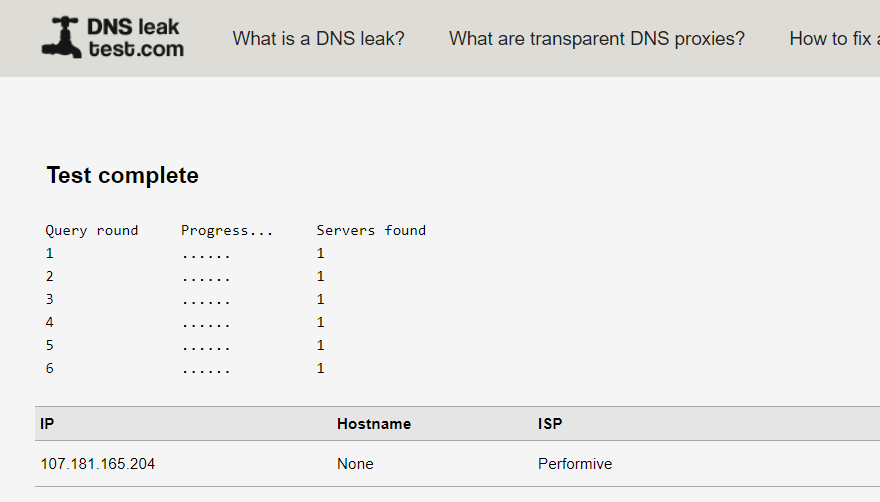
When you connect to one of NordVPN’s servers, your device uses DNS servers operated by them, meaning that every DNS query flows through an encrypted tunnel and is resolved on the same server you’re using. This is ideal because it prevents things like everyday web queries and confidential information from leaking out to third parties who could use it to spy on you.
We ran two DNS leak tests from different companies to ensure an accurate result…
DNSLeakTest.com:
IPLeak.org:
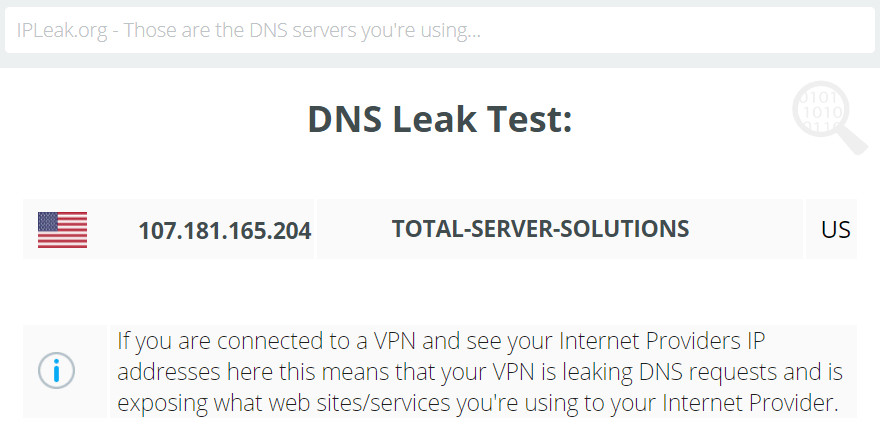
The IP address in both tests is to a DNS server operated by NordVPN, which is exactly what you’re looking for in a test like this. It’s also precisely what the company claims on their website.
Where Are NordVPN’s Servers?
Short Answer: Most of the 5,000+ servers are in the Americas and Europe, but your options include a total of 60 countries.
VPNs that have a large collection of servers are better for multiple reasons than those that don’t, such as top speeds for more people around the globe and a way to bypass geoblocks.
NordVPN has over 5,000 positioned across 60 countries. This is good coverage that’s far more than some VPNs like TunnelBear which covers 23, but it doesn’t outperform others like ExpressVPN’s 94 countries.
Over 4,500 of their servers are in the Americas and Europe. The rest are in Australia, Singapore, Indonesia, and other Asia Pacific areas, as well as South Africa, India, Israel, Turkey, and UAE. Their server locations list is extremely thorough, showing how many servers are in each country and which ones support P2P, double VPNs, dedicated IP addresses, obfuscation, and the onion network.

Unlike most other providers, NordVPN runs colocated servers that they say are fully owned, maintained, and managed by them. It’s still in the early stages, so this isn’t true for anything close to all of their servers, but it’s a step in the right direction that should allow for quicker responses to any future hack attempts or server issues.
Dedicated IP addresses are available in the US, the UK, the Netherlands, Germany, and France. But they’re not included in your VPN subscription—it costs an additional yearly fee. A dedicated IP address can be used simultaneously on two devices.
Something else to note is that the company recently (late 2020) expanded its infrastructure to accommodate 10 Gbps servers. This is a massive improvement over their previous 1 Gbps servers. The whole network doesn’t support this higher capacity, but for the ones that do, it translates to faster speeds for more people.
What Does NordVPN Unblock?
Short Answer: Netflix and other websites run just fine while on the VPN.
- Netflix? Yes
- Hulu? Yes
- Disney+? Yes
NordVPN uses what it calls SmartPlay to access content that would normally be unavailable where you are. It’s built-in to all of their apps so that you can unblock streaming sites and other services without having to do anything extra—no options to enable or extra things to buy.
There’s a collection of how-tos for using SmartPlay on NordVPN’s website if you need guidance, like how to watch Netflix, Hulu, Disney+, etc. Usually, you can just connect to any server, but there are some exceptions.
Below is an example of NordVPN’s location-switching in action with a Netflix movie. This particular title that I’m searching for is available from the Netflix Australia library, so accessing it from the US shows this (it’s not available):

Switching over to a server in Australia, however, populates the movie just fine:

You can see how simple it is to watch TV shows and movies that aren’t available where you are. In my experience, videos didn’t buffer any longer than usual and the whole experience felt identical to when the VPN was off.
We also tested Hulu and Disney+ and they worked just as well.
How Much Data Can You Use on NordVPN?
Short Answer: You get unlimited bandwidth, so there are zero restrictions.
A VPN can rack up quite a bit of data throughout the month through downloads and streams, so if those activities are important to you, it’s necessary to use a provider like NordVPN that supports unlimited network bandwidth. This means it doesn’t place a limit on how much data moves through the VPN on any given day or month, so you won’t get kicked off a server or have to pay extra if you use huge globs of data.
If a VPN places a bandwidth limit on its users, you have to monitor how much you’re using so that you don’t reach the limit before it resets. This would make it hard to stream movies and music, or download files on a regular basis. NordVPN doesn’t even monitor how much data you’re using, so it’s without question that they have no data usage restrictions.
It’s crucial to remember, however, that a VPN isn’t the same thing as your ISP. If there’s a bandwidth limit placed by your ISP (be it your mobile carrier or the one that supplies your home internet), it still applies even when you use a VPN.
How Fast Is NordVPN?
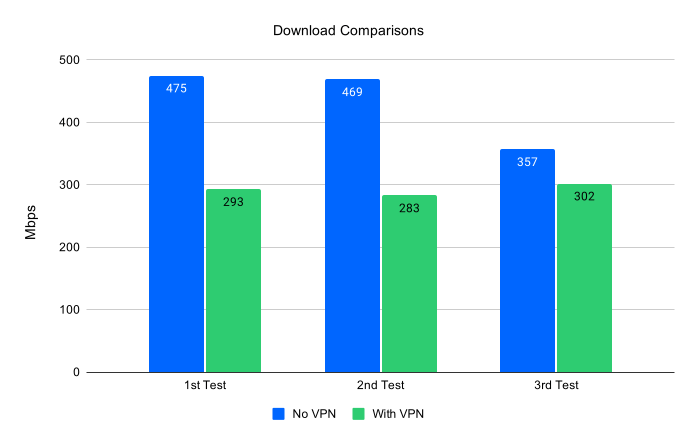
Short Answer: All three tests clocked in at over 280 Mbps with a top speed of 300 Mbps, faster than any VPN I’ve tested.
NordVPN has a bold “fastest VPN experience on the planet” claim. They even have speed tests (over 200,000 of them) to prove it and say that there are zero limits on speed.
How do they do this? Their NordLynx encryption protocol is reportedly twice as fast as OpenVPN, a protocol you can use with NordVPN, too, that’s also available through lots of other VPN apps. It’s based on WireGuard and is built for users who want optimum speed.
We won’t duplicate their thousands of tests but we will get a general idea of whether or not the claims are even remotely true by running my own.
I’ll start with a baseline. This is what my speed looked like before connecting to the VPN:

- Download: 469 Mbps
- Upload: 946 Mbps
- Ping: 10ms
Note: My speed tests always consist of three made back to back, but we use only the median result. All three of these results are here, here, and here.
Next, we connected to the fastest server (according to the desktop app) using the NordLynx VPN protocol. I again produced three results (here, here, and here), with this one being my selection for the comparison:

- Download: 293 Mbps
- Upload: 272 Mbps
- Ping: 17ms
Another way to look at these numbers is to see that 62% of my download bandwidth was retained despite the VPN running during the test. Ideally, you’d have access to 100% of your bandwidth while using a VPN, but that’s not usually possible. This speed drop is actually not bad at all when you compare it with other VPNs like ExpressVPN which held on to just 34% of its bandwidth, and Surfshark with its 7%.
Uploads took a much greater impact when we turned the VPN on. It dropped 70%, meaning that it ran at just 30% of my upload capacity. However, the speeds we got still outperformed most competing VPNs (PIA tested at over 100 Mbps slower).
Do Torrents Work With NordVPN?
Short Answer: Special P2P servers are available and a handy app-based kill switch keeps you secure even if the VPN connection drops.
Most VPNs support torrents, NordVPN included. What makes this provider different is that it lets you pick from servers that are specifically P2P compatible. They’re optimized for file sharing and you can select a server within that group that has the lowest load to get the best performance.
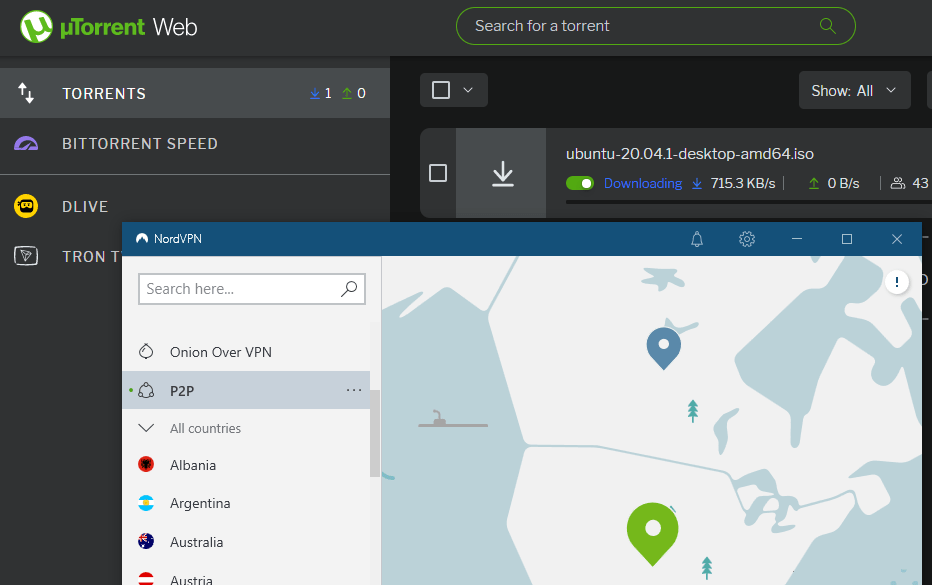
Beyond its no-log policy (your IP address and activity on the VPN aren’t stored anywhere) and strong encryption, it also has a really great kill switch feature to ensure maximum privacy. There’s an option to shut down your torrent program if the VPN connection becomes disconnected. This means you can be absolutely positive that if the security of the VPN isn’t there, your torrents will stop working. Your real IP address will never be exposed.
NordVPN is really fast, but some ISPs impose bandwidth throttling to limit their users from sucking up loads of bandwidth. A VPN can usually bypass those restrictions, but if not, NordVPN has another trick up its sleeve: obfuscated servers. Like the P2P servers, these are set aside in their own category in the app and can be used to hide the fact that you’re on a VPN. It might slow things down but it’s a tactic most VPN providers don’t use, so it’s nice to see that it’s an option here.
NordVPN Supported Devices
Short Answer: All the popular mobile and desktop devices are supported.
A downloadable app is available for these platforms:
- Android
- iOS (iPhone and iPad)
- Windows
- macOS
- Linux
- Chrome, Edge, and Firefox
- Android TV
If you have a compatible router or you’re willing to buy one that works with NordVPN, you can get all the VPN’s benefits for all your devices that way. There’s more on that below.
One account can be used on up to six devices at the same time. This means you could get on the VPN from a few phones and computers simultaneously. The only thing to be aware of is that if the devices are connected to the same server, you have to choose different VPN protocols.
NordVPN Desktop App Review
NordVPN’s desktop app has all the features you’d expect in a premium VPN. It manages to squeeze it all into an app that’s super simple to understand. All the settings are hidden away so that you don’t have to bother with them if you don’t want to. If you’re not interested in tinkering with the settings or even choosing a specific server, selecting Quick Connect will land you on the fastest server in just a few moments.
The primary screen, the one you’ll be using most often, is this large map that you can drag around with your mouse to find the country you want to connect through:
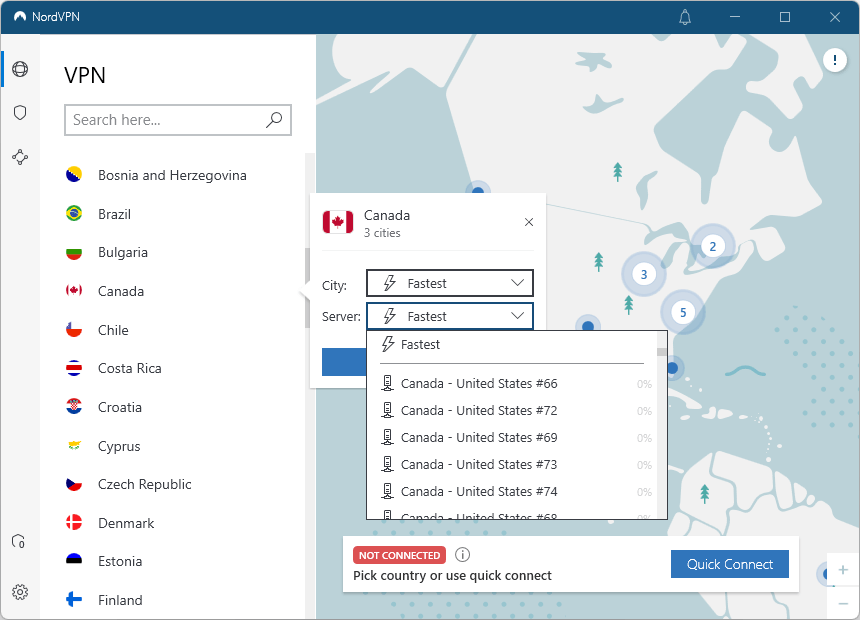
Of course, you can use the search bar, too, or click through the list of countries in the sidebar. Selecting any country will, by default, connect you to the fastest server that’s available at that moment. But you also have the freedom to pick one manually from any supported region.
Specialty servers for a dedicated IP address, double VPN, Onion over VPN, and P2P are listed on the side menu, too, and you connect to them just like you would anything else.
The Windows app has a special kill switch feature that’s definitely worth mentioning because it’s not something you’ll find in other VPNs. Normally, a kill switch will disable your internet connection if the connection to the VPN server is stopped for whatever reason. The Windows app has a second option: block a specific application if the VPN connection drops or you disconnect it.

So, if you’re using the kill switch with your torrent program or web browser, for example, and you want to ensure that it will stop communicating with the internet if you’re off of the VPN, you can turn on the app kill switch. This closes the program automatically but doesn’t affect your other apps. When you enable this, you can choose one or more programs that should shut down.
- Enable CyberSec to block ads and malicious sites
- Shows the VPN’s IP address
- Pause the VPN for a set amount of time
Here are other features in the desktop app, as well as additional options accessible through the settings:
- Automatically open when the computer starts up
- Launch the app minimized
- Show VPN connection status notifications
- Change the language of the program
- Auto-connect to a specific server when the app launches or when you connect to a specific Wi-Fi network
- Choose trusted networks where the VPN won’t auto-connect
- Switch between the NordLynx and OpenVPN protocols
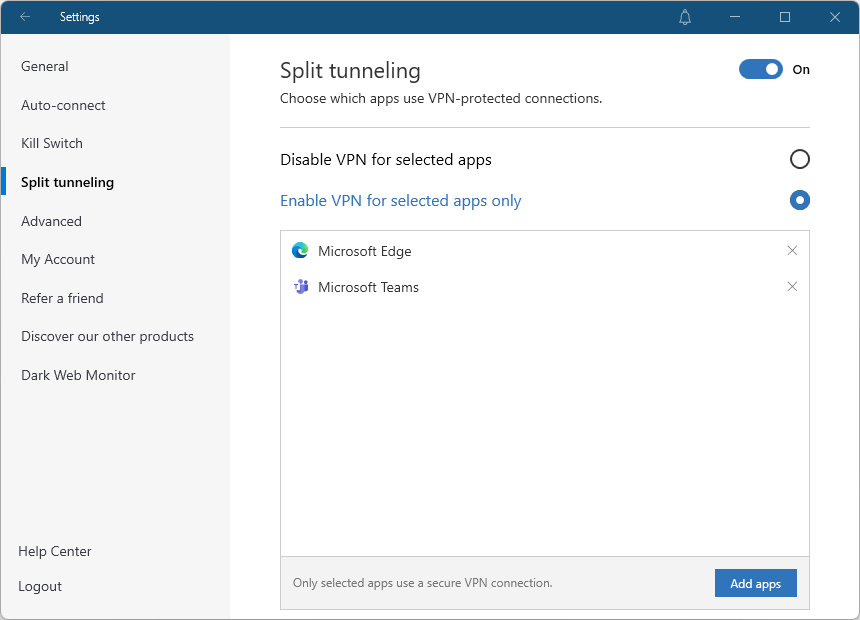
- Enable split tunneling to pick which apps the VPN should be disabled or enabled for
- Use custom DNS servers instead of the ones provided by NordVPN
- Enable obfuscated servers to help prevent VPN detection
- Make your computer invisible on the local network (to printers, other computers, TVs, etc.)
- Disable sending anonymous crash reports
- Access account-related details, like your friend referral link and the date your subscription started and will end
- Enable Dark Web Monitor to check if your email address has been included in any data leaks
- Enable Threat Protection to block ads, trackers, and malicious websites and files
- Connect to other devices remotely with Meshnet to access files, play games, route traffic through another device, etc.
- A “security score” provides a quick look at how many protection-related settings are turned on
Here are screenshots of some of the other settings screens:


NordVPN Mobile App Review
The NordVPN mobile app is one of the most comfortable ones I’ve used. This is easy to say because the server selection screen is very straightforward, and everything else you might want to use is tucked away in the other tabs.
Using the Quick Connect button is by far the fastest way to locate the best server based on your location, but there’s also a map where you can pick a country visually. You don’t have as much control as the desktop app to pick a specific server from the bunch, but you can choose the region within the country. You can also open the specialty servers to find ones that are good for P2P or obfuscation.

The mobile app also lets you:
- Auto-connect when on cellular, Wi-Fi, or always
- Change the protocol: NordLynx or OpenVPN
- Disable VPN for selected apps (Android only)
- Set custom DNS servers on Android
- Allow local network discovery on Android to use printers, TVs, etc.
- Set the VPN connection as metered for more control over how much data your phone uses through downloads and other apps
- Enable Threat Protection to block malicious sites
- Check if your email has been part of any leaks
- Toggle the kill switch on or off on Android
- Link remove devices in Meshnet
- Enable tapjacking protection on Android to require two steps when disabling the VPN
- Switch between light and dark mode
- Manage multi-factor authentication
- Refer friends to get free service
NordVPN Browser Extension Review
NordVPN has a browser extension if all you need protection on is your web browser. It’s extremely easy to use because there are just a few screens and minimal options to deal with. Just select a country to connect to the fastest server there, or have one chosen for you based on your location.

You can also disable the VPN for websites of your choosing, block WebRTC, and enable Threat Protection to block ads, known malicious sites, and phishing attempts.
NordVPN On Routers & Other Devices
You can run NordVPN from a router using the OpenVPN protocol. The benefit of doing that is that it counts as just one of your six total simultaneous device connections even though it will serve any and all devices that use your router. Manual VPN setup isn’t as easy to do as just downloading an app and compatibility varies between models, but there are setup documents on their site that will walk you through it all.
NordVPN used to use the older L2TP and PPTP protocols but their servers stopped supporting them in 2018, so routers that can only use those protocols can’t work with their VPN. They keep a list of recommended routers if you don’t have one that’s compatible.
Several other connectivity how-tos are available for if you want to use a proxy instead of a VPN, set up NAS, unblock content with SmartDNS, or use NordVPN with your gaming console.
NordVPN Support Options
Short Answer: 24/7 support via email and live chat. The Help Center has self-help options like a FAQ.
Speedy support is important for when you have billing, setup, or connection problems. NordVPN offers three primary support methods: live chat, email, and the self-help center.
If you need answers right now and you can’t find them in the Help Center, try the live chat. I got someone to connect with me in under a minute. When you’re finished, you can download the transcript or have it emailed to you to review again later.

Email responses, according to NordVPN, could take up to 24 hours. It was four days for me, but I didn’t have a pressing issue, which might have put me at the bottom of the priority list.
Visit NordVPN for more information!
 techy.zone